


P31i | Wireless Earbuds with Immersive Adaptive ANC
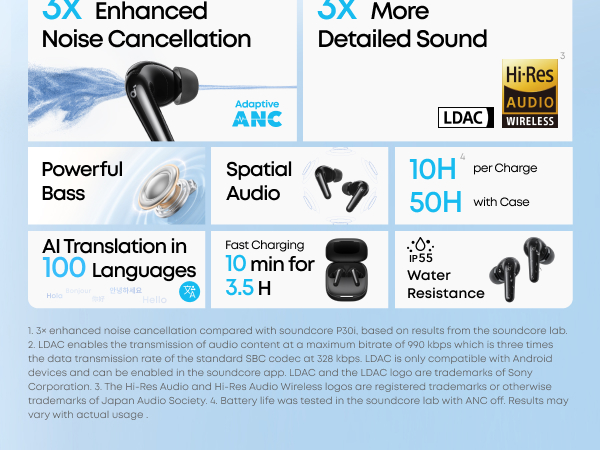
- Real-Time Adaptive Noise Cancelling: Reduces noise by up to 52 dB with adaptive technology that detects your surroundings and automatically chooses the best noise-cancelling level for you.
- Hi-Res Certified Sound with LDAC: Enjoy stunning, lossless Hi-Fi audio powered by LDAC and Hi-Res Audio certifications. These noise-cancelling earbuds accurately deliver the fine details for rich, well-balanced treble and bass.
- Free AI Translation: Instantly understand 100 languages with accurate two-way translation to make communicating with the world even easier and real-time translation so you understand speeches or meetings no matter where you are.
- Crisp, Clear Calls: Six microphones and advanced AI work together to filter out external noise and wind for crystal-clear calls. Be heard loud and clear no matter where you are, for conversations that sound like they're face-to-face.
- Listen for Longer: Get up to 10 hours of playtime on a single charge and a total of 50 with the case, with noise cancellation enabled, get up to 8 hours of playtime on a single charge and a total of 40 with the case. A 10-minute charge delivers up to 3 hours of playtime.
color:
699 kr

- Real-Time Adaptive Noise Cancelling: Reduces noise by up to 52 dB with adaptive technology that detects your surroundings and automatically chooses the best noise-cancelling level for you.
- Hi-Res Certified Sound with LDAC: Enjoy stunning, lossless Hi-Fi audio powered by LDAC and Hi-Res Audio certifications. These noise-cancelling earbuds accurately deliver the fine details for rich, well-balanced treble and bass.
- Free AI Translation: Instantly understand 100 languages with accurate two-way translation to make communicating with the world even easier and real-time translation so you understand speeches or meetings no matter where you are.
- Crisp, Clear Calls: Six microphones and advanced AI work together to filter out external noise and wind for crystal-clear calls. Be heard loud and clear no matter where you are, for conversations that sound like they're face-to-face.
- Listen for Longer: Get up to 10 hours of playtime on a single charge and a total of 50 with the case, with noise cancellation enabled, get up to 8 hours of playtime on a single charge and a total of 40 with the case. A 10-minute charge delivers up to 3 hours of playtime.
Order Support
Payment Method
Delivery Method

P31i | Wireless Earbuds with Immersive Adaptive ANC
699 kr

Pure Sound, Powerful Silence
Smarter Adaptive ANC, 3× Stronger Noise Cancellation
Featuring up to -52 dB noise reduction, the upgraded ANC adapts in real time to any environment for peace and quiet.Note: 3× stronger noise cancellation compared with soundcore P30i, based on results from soundcore's internal lab.
3× More Detailed Sound
Hi-Res Audio technology unlocks 3× more detail by transmitting music at a higher resolution than standard Bluetooth, so you enjoy crystal clarity wherever you are.
2x the Power with No Muddy Bass
Equipped with 11 mm titanium-coated drivers, the earbuds deliver tighter, more responsive vibrations—an experience you won't forget with deep, punchy bass and rich, detailed treble.Note: 2× more powerful bass compared with soundcore P30i, based on results from soundcore's internal lab.
Connect with the World, Instantly
Supports 100+ languages with AI-powered translation so you can network, learn, and communicate without language barriers.
Your Voice, Loud and Clear
With 6 microphones and an AI algorithm for noise reduction, your voice stands out whether you're in a busy office, crowded train, or on a windy street.
All-Day Listening Up to 50H Playtime with Case
ANC OFF10H Per Charge
50H With Case
ANC ON
8H Per Charge
40H With Case
10 Mins=3.5 Hrs
Fast ChargingNote: Data is based on internal lab testing. Actual performance may vary depending on specific conditions of use.

IP55 Water and Dust Resistance
With IP55 dust and water resistance, soundcore P31i is ready for sweat, rain, and unpredictable moments in everyday life.
Product Information


FAQ
Wearing
How do I wear soundcore P31i/R60i NC ?
1. Check the L/R logos on the back of the earbuds to ensure you're wearing them on the correct sides. Rotate the earbuds to find the most comfortable position.
2. Try different ear tip sizes to find the best fit and create a tight seal. If one earbud doesn't fit well, consider using different sizes for each ear, such as medium in one ear and large in the other.
3. Use the Fit Test in the soundcore app to check how well your earbuds fit.
4. Insert the earbuds into your ears and rotate them gently until they feel secure.
What should I do if I feel discomfort after wearing P31i/R60i NC for an extended period?
1. Try different sizes of ear tips. If one earbud feels uncomfortable, consider using different sizes for each ear, such as medium in one ear and large in the other.
2. Rotate the earbuds to find the most comfortable position. Use the Fit Test in the soundcore app to check how well your earbuds fit.
3. Take breaks during extended wear to give your ears a rest.
4. If the above methods still do not resolve your issue, please contact customer service for assistance.
What should I do if my P31i/R60i NC earbuds fall off easily?
1. Try different sizes of ear tips. If one earbud feels uncomfortable, consider using different sizes for each ear, such as medium in one ear and large in the other.
2. Rotate the earbuds till they feel comfortable and secure. Use the Fit Test in the soundcore app to check how well your earbuds fit.
3. If the above methods still do not resolve your issue, please contact customer service for assistance.
Why do my ear tips flip easily when I wear my P31i/R60i NC?
1. Please try using it for a longer period of time; the situation may improve.
2. Try different sizes of ear tips.
3. If the above methods still do not resolve your issue, please contact customer service for assistance.
ANC
What should I do if soundcore P31i/R60i NC's noise cancellation does not meet my expectations?
1. Experiment with different sizes of ear tips to find the best fit and achieve a tight seal. If one earbud doesn't fit well, try using different sizes for each ear, such as medium in one ear and large in the other.
2. Use the Fit Test in the soundcore app to check how well your earbuds fit. A poor fit may affect the quality of noise cancellation.
3. Enable Real-time Adaptive ANC in the app, and the earbuds will automatically select the optimal amount of noise reduction according to your environment.
4. In the app, select Noise Cancellation > Mode > Adaptive ANC/Manual Mode/Multi-Scene ANC. Choose the appropriate noise cancellation mode based on your personal preference and noise level in your environment.
5. Test the earbuds in various environments to see if there's a difference in performance. Since ear canals differ from person to person, try different ear tips for each ear if you fail the Fit Test.
6. Wind Noise Reduction is recommended for use in windy environments. Please disable in indoor or calm conditions.
Note: Noise cancellation might seem less effective in noisy environments.
What should I do if I experience dizziness and discomfort when using ANC mode on P31i/R60i NC?
You can adjust the noise cancellation level through the soundcore app to improve comfort. There are 5 levels, ranging from 1 (minimum) to 5 (maximum). Lowering the level to 1-3 may help reduce discomfort.
Follow these steps to adjust:
1. Open the soundcore app.
2. Go to Noise Cancellation > Mode and select Manual Mode.
3. Drag the slider to set your preferred noise cancellation level.
What should I do if I hear wind noise while using soundcore P31i/R60i NC outdoors?
1. Open the soundcore app and turn on Wind Noise Reduction on the Noise Cancellation home page and see if it helps.
2. For optimal audio quality, use Wind Noise Reduction only in windy conditions.
What should I do if I hear background noise while using ANC mode on P31i/R60i NC?
1. It might be due to a poor fit. Follow these steps to ensure they fit properly:
- Check the L/R logos on the back of the earbuds to ensure you're wearing them on the correct sides. Rotate the earbuds to find the most comfortable position.
- Try different ear tip sizes to find the best fit and create a tight seal. If one earbud doesn't fit well, consider using different sizes for each ear, such as medium in one ear and large in the other.
2.Adjust the level of noise reduction to 4 in the app to see if it helps.
Follow these steps to adjust:
1) Open the soundcore app.
2) Go to Noise Cancellation > Mode and select Manual Mode.
3) Drag the slider to set your preferred noise cancellation level.
3. It is recommended to switch from Noise Cancellation to Normal mode to verify whether the noise persists.
4. In Noise Cancellation mode, the earbuds capture ambient noise through the microphones and generate countering sound waves to cancel it out. This process requires real-time computation, during which the circuitry itself generates extremely low-amplitude electronic noise.
5. All electronic devices inherently produce some noise (such as humming sounds) during operation.This noise is barely perceptible but still present; individuals with highly sensitive hearing may detect it.
6. Try these earbuds with different audio inputs and Bluetooth devices (phones/tablets/etc.) to see if the issue persists.
Note: Noise cancellation might seem less effective in noisy environments.
What should I do if I hear noise while using soundcore P31i/R60i NC?
1. Reset your earbuds by following these steps:
- Remove the earbuds from the charging case.
- After putting on the earbuds, simultaneously hold the touch surfaces on both earbuds for 10 seconds. A prompt tone confirms a successful reset.
2. Test your earbuds with different Bluetooth devices in various environments to see if the issue persists.
Why do I hear some noise when using P31i/R60i NC in Transparency Mode?
1. First, confirm whether this noise originates from the earbuds themselves, and if it persists after switching to Normal or an ANC mode.
If the noise disappears, it is caused by the capturing of ambient sounds in Transparency Mode, which is normal.
2. Transparency Mode amplifies surrounding ambient sounds to help you stay aware of your environment. This may result in faint background noise.
3. If it is a slight, persistent noise, this is normal. If the noise is loud enough to interfere with normal use of the earbuds, please contact customer service for assistance.
Connecting
How do I reset soundcore P31i/R60i NC?
Reset your earbuds by following these steps:
- Remove the earbuds from the charging case.
- After putting on the earbuds, simultaneously press and hold the touch area on both earbuds for 10 seconds. Hearing a prompt tone confirms a successful reset.
If the earbuds fail to reset, troubleshoot using the following steps:
1. Ensure the charging case and earbuds can connect properly.
2. Verify that both the charging case and earbuds have sufficient battery power.
3. Clean the charging pins with a dry cloth to remove any dirt or debris that may interfere with the charging process.
If my P31i/R60i NC is already connected to two devices, how do I connect it to another device?
There are two ways to do it.
Option 1: Disconnect One Device
1. Turn off Bluetooth on one of your devices, or go to its Bluetooth settings and disconnect the earbuds.
2. In the soundcore app, go to More Settings > Dual Connections > Device List and toggle off your device. Then, tap to select and connect a new device, or hold both earbuds for 3 seconds to enter pairing mode.
Option 2: Disconnect Both Devices
Place the earbuds in the charging case and leave the case open. Then, press the case button for 3 seconds to connect via Bluetooth.
How do I resolve pairing/connection issues with my P31i/R60i NC?
Possible issues with pairing/connection:
1. Earbuds not pairing.
2. Sound only coming from one earbud.
3. One earbud not connecting with the other earbud/the device.
4. No audio playback after connecting to my device.
5. Earbuds failing to automatically connect when removed from the case.
Steps to fix:
1. Restart your device. Then, turn off Bluetooth on your device and remove all paired devices.
2. Reset your earbuds using the following steps:
- Place the earbuds in the charging case and ensure the case lid stays open.
- After putting on the earbuds, simultaneously press and hold the touch area on both earbuds for 10 seconds. Hearing a prompt tone confirms a successful reset.
3. Turn Bluetooth on on your device and select "soundcore P31i/R60i NC" to pair.
4. Try pairing with another device, like a phone or tablet, to see if the issue persists.
If you see a prompt to confirm pairing, select "Pair." If you accidentally select "Cancel," turn your device's Bluetooth off and on again, then try again.
What should I do if P31i/R60i NC disconnects or the sound is choppy?
This may have something to do with the connected device and your environment. Bluetooth signal strength may be affected by walls, pillars, home appliances, Wi-Fi, and more. Avoid these to ensure a stable connection.
To fix this issue, do the following:
1. Fully charge your earbuds and reset them as follows:
- Place the earbuds in the charging case and leave the case open.
- After putting on the earbuds, simultaneously press and hold the touch area on both earbuds for 10 seconds. Hearing a prompt tone confirms a successful reset.
2. Turn off Dual Connections in the soundcore app.
3. Test the earbuds by playing downloaded music/videos.
4. Test your earbuds with a different Bluetooth device in a different environment to see if the issue persists.
What should I do if there is a delay in playback between my P31i/R60i NC and the device?
It's normal to experience a short delay with Bluetooth earbuds due to Bluetooth technology limitations. This delay is usually minimal and should not impact your experience. However, factors such as the earbuds, connected device, audio source, app, and network can influence the delay.
To fix this issue, do the following:
1. Forget the earbuds in your device's Bluetooth settings and restart your Bluetooth device.
2. Fully charge your earbuds and reset them as follows:
- Place the earbuds in the charging case and leave the case open.
- After putting on the earbuds,simultaneously press and hold the touch controls on both earbuds for 10 seconds. A reset confirmation tone indicates successful reset.
3. Test your earbuds with a different Bluetooth device or app, and play downloaded music/videos to see if the issue persists.
4. If you require low latency, you can enable Gaming Mode via the app by going to Sound Effects > Spatial Audio > Gaming Mode. Note that audio quality may be slightly reduced in this mode.
5. Turn off Dual Connections in the soundcore app.
Note: Ensure the Bluetooth device and earbuds are within range and free from signal interference.
How do I enable Dual Connection on P31i/R60i NC?
To pair your earbuds with a second device while already connected:
Option 1:
Press both earbud stems for 3 seconds. You will hear a prompt tone indicating the earbuds have entered pairing mode.
Option 2:
Open the app, go to Settings > More Settings > Dual Connections, and turn it on.
Why can't my soundcore P31i/R60i NC reconnect to my device after disconnecting or going out of range?
1. It might be due to incompatibility with certain phones or tablets (e.g., iOS 18.1.0). Update your device's system to the latest version and try again.
2. Turn your phone's Bluetooth off and on again. Place the earbuds in the case, close the lid, then open it to reconnect.
3. Try connecting to other devices to see if the issue persists.
Charging
How long does it take to fully charge P31i/R60i NC?
About 1 hour.
How long does it take to fully charge P31i/R60i NC's charging case?
About 3 hour.
What should I do if the battery of a single P31i/R60i NC earbud is draining quickly?
Under normal conditions, the earbuds offer approximately 8 hours of use in ANC mode and about 10 hours in normal mode (at 50% volume). Playback time may vary slightly depending on music content and volume level. When using the earbuds for calls, playback time will be reduced since calls consume more power than music playback. Please note that a difference of less than 1 hour between the left and right earbuds is normal.
If the discrepancy exceeds 1 hour, please try the following steps:
1. Ensure the protective film has been removed from the earbuds' surface.
2. Clean the charging contacts on the charging case and earbuds using a dry cloth/cotton swab dipped in medical alcohol to ensure proper connection during charging.
3. Verify the charging case has sufficient power, and the earbuds display normal battery levels while inside the case during charging.
4. Test battery life while playing music. Since ANC is enabled by default, switch to standard mode first if you need to test battery life in standard mode.
What is my P31i/R60i NC playtime from a single charge?
- ANC
Single charge: 8 hours
Total playtime with case: 40 hours
- Normal
Single charge: 10 hours
Total playtime with case: 50 hours
- Call
Single charge with ANC on: 5.3 hours
Note: Battery playtime is based on tests conducted in the soundcore laboratory using the default settings, in Normal mode, and at 50% volume. Actual playtime may vary depending on volume, audio source, environmental factors, usage, and other conditions.
How do I resolve charging issues with my P31i/R60i NC?
Possible issues with power:
1. The earbuds aren't charging.
2. The earbuds are still connected to my device even after returning to the case and closing the lid.
3. The earbuds aren't powering on when taken out of the case.
Steps to fix:
1. Ensure the ear tips do not obstruct the charging pins on the earbuds or in the charging case. Verify the earbuds are connected to the charging case. Place the left and right earbuds into the case separately. If the indicator lights on the charging case turn on for 5 seconds and then turn off, this indicates a successful connection.
2. Use a dry cloth or a cotton swab with rubbing alcohol to clean the charging pins on both the earbuds and the case.
3. Use different charging cables and wall chargers to charge the charging case, and ensure the case has sufficient power. The case cannot charge the earbuds when its battery level is below 5%.
If your earbuds haven't been used for a long time, charge them for at least 2 hours before use.
Sound
How do I use my P31i/R60i NC for the first time?
1. First, remove the protective films from the earbuds.
2. Place the earbuds into the charging case.
3. Close the lid and open again to enter pairing mode.
How do I adjust the volume via touch controls on my P31i/R60i NC?
The feature is disabled by default. You can enable this feature in Controls in the soundcore app by going to Controls > Single Tap > Volume -/+.
What should I do if I experience poor sound quality when using soundcore P31i/R60i NC?
1. Try different ear tip sizes to find the best fit and create a tight seal. If one earbud doesn't fit well, consider using different sizes for each ear, such as medium in one ear and large in the other.
2. Listen to different types of music and ensure the audio source is free from distortion or noise.
3. Experiment with different EQ modes in the soundcore app, and customize the EQ to your preference.
4. In the soundcore app, go to the P31i/R60i NC Home Page > More Settings > Sound Mode > Preferred audio quality LDAC. In this mode, you can enjoy high-quality audio. Increased power consumption and occasional minor lag in certain scenarios are normal.
Note: LDAC functionality is only available for Android phones. iOS phones do not support LDAC.
What should I do if the volume is low on one side of my P31i/R60i NC?
1. Gently clean the mesh on the rubber earpiece and the metal mesh underneath using a cotton swab dipped in a small amount of rubbing alcohol.
2. Fully charge and reset the earbuds as follows:
- Place the earbuds in the charging case and leave the case open.
- After putting on the earbuds, simultaneously press and hold the touch area on both earbuds for 10 seconds. Hearing a prompt tone confirms a successful reset.
3. Check the audio balance on your phone.
On Android devices: Go to Settings > Accessibility > Audio and On-Screen Text > Audio > Balance.
On Samsung devices: Go to Settings > Accessibility > Hearing Enhancements > Connected Audio.
On iOS devices: Go to Settings > Accessibility > Audio/Visual > Audio Balance.
Note: Moving the balance slider to the left increases the volume in the left earbud and decreases it in the right earbud, and vice versa.
What should I do if the bass quality is poor on my P31i/R60i NC?
If the audio lacks bass, the earbuds will reproduce it accordingly.
To address this issue, try the following:
1. Fully charge your earbuds and reset them as follows:
- Place the earbuds in the charging case and leave the case open.
- After putting on the earbuds, simultaneously press and hold the touch area on both earbuds for 10 seconds. Hearing a prompt tone confirms a successful reset.
2. Play different types of music and increase the volume on your connected device. Check if bass performance improves.
3. If the earbuds are not properly seated in your ears, you may not experience optimal bass performance. Try different ear wing sizes to ensure you have the best fit.
4. In the soundcore app, go to Sound Effect and select "Bass Booster" from the EQ options.
5. In the soundcore app, go to Custom EQ and adjust equalizer settings.
6. Test the earbuds with a different Bluetooth device to see if there is any difference in bass performance.
What should I do if the volume is low when my P31i/R60i NC is connected to my computer/phone?
1. Please adjust the fit to ensure a secure seal. Improper wearing may affect sound quality.
2. When wearing both earbuds, switching to listening from one earbud will switch the system to Normal mode. Check if fluctuations in volume are related to the change in mode.
3. Verify if Wind Noise Reduction and Adaptive ANC are enabled. Volume fluctuations may occur due to changes in the environment.
4. We recommend disabling Wind Noise Reduction in everyday environments.
What should I do if the volume fluctuates suddenly on my P31i/R60i NC?
1. Please adjust the fit to ensure a secure seal. Improper wearing may affect sound quality.
2. When wearing both earbuds, switching to listening from one earbud will switch the system to Normal mode. Check if fluctuations in volume are related to the change in mode.
3. Verify if Wind Noise Reduction and Adaptive ANC are enabled. Volume fluctuations may occur due to changes in the environment.
4. We recommend disabling Wind Noise Reduction in everyday environments.
How do I set up soundcore P31i/R60i NC's sound inputs and outputs from my computer?
For Windows computers:
1. Listening to audio only: Select "soundcore P31i/R60i NC Stereo" for computer audio. Adjust both the software and computer volume as needed.
2. Using a conference app (e.g., Zoom, Microsoft Teams):
Set the input and output in the app as:
Microphone: soundcore P31i/R60i NC Hands-Free
Speaker: soundcore P31i/R60i NC Hands-Free
Adjust the volume in the app. If that's unavailable, select "soundcore P31i/R60i NC Hands-Free" as the output in your computer's settings.
3. Using an audio/video app without input/output settings:
In your computer's audio settings:
Input: soundcore P31i/R60i NC Hands-Free
Output: soundcore P31i/R60i NC Hands-Free
For macOS computers:
Set both the input and output to soundcore P31i/R60i NC.
MIC
What should I do if I experience poor sound quality when I use P31i/R60i NC for calls?
1. Make sure the volume is set to maximum on both the earbuds and the connected device.
2. Try using ear tips that fit more snugly and ensure the earbuds are positioned correctly to create a proper seal. An improper fit can affect call quality.
3. Switch to the phone's microphone and make a call to see if the issue persists.
4. Test the earbuds in a quieter environment.
What should I do if the person on the other says my voice sounds very quiet and unclear when I use P31i/R60i NC for calls?
1. If using only one earbud, make sure the other earbud is in the charging case.
2. Try using ear tips that fit more snugly and ensure the earbuds are positioned correctly to create a proper seal. An improper fit can affect call quality.
3. Ensure "soundcore P31i/R60i NC" is selected as the audio output on your connected device and increase the volume on your device.
4. If the call was made through an app, try using your phone's native calling feature instead to see if the issue persists.
5. Test the earbuds with a different Bluetooth device and in a different environment to see if there is any difference.
6. Clean the earbuds and check if the microphone at the bottom is blocked.
What should I do if the other person can't hear me clearly during calls on P31i/R60i NC?
1. Try using ear tips that fit more snugly and ensure the earbuds are positioned correctly to create a proper seal. An improper fit can affect call quality.
2. Fully charge your earbuds and reset them as follows:
- Place the earbuds in the charging case and leave the case open.
- After putting on the earbuds, simultaneously press and hold the touch area on both earbuds for 10 seconds. Hearing a prompt tone confirms a successful reset.
3. Ensure "soundcore P31i/R60i NC" is selected as the audio output on your connected device and increase the volume on your device.
4. If the call was made through an app, try using your phone's native calling feature instead to see if the issue persists.
5. Test the earbuds with a different Bluetooth device and in a different environment to see if there is any difference.
6. Try calling other contacts to see if you experience similar issues, ensuring it's not due to poor network reception on their end.
How do I trigger my phone's voice assistant via P31i/R60i NC?
You can customize the controls in the app. Open the app, go to Controls > Double Press/Triple Press/Long Press > Voice Assistant. Note that "Single Press" can't be used for this function.
APP
What should I do if firmware updates for my P31i/R60i NC update firmware were unsuccessful?
1. If the download fails, please try again in an environment with a stable internet connection.
2. If the installation fails, uninstall and reinstall the soundcore app, restart your phone, and try again.
3. Try using a different phone.
4. Modify location permissions and settings: Go to Settings > Privacy > soundcore > Location > Allow Only While Using the App.
If the issue persists, please provide us with your phone model and the serial number from the app, and we'll look into it.
What should I be aware of when updating the firmware for my P31i/R60i NC?
- Keep the earbuds in the charging case with the case open.
- Ensure the earbuds have over 20% of charge.
- Do not use the earbuds during the process.
- If the update fails, try again.
- If possible, try the upgrade with another device.
- Avoid updating the firmware in areas with potential interference, such as dense Wi-Fi networks or cell phone towers. Try updating again in a different location.
What should I do if I can't find my P31i/R60i NC in the soundcore app, or it won't connect?
1. Download the latest version of the soundcore app from your app store. If you already have the app, uninstall and reinstall it.
2. Pair your earbuds with your phone. Currently, the soundcore app does not support computers.
3. Open the app, tap the grid icon at the bottom left corner to enter My Devices, then tap Add Device. The app will automatically connect to soundcore P31i/R60i NC.
Note: You must enable location permissions the first time you use the app.
4. If the connection fails, go to Set Up Manually > Other Series > soundcore P31i/R60i NC to check if it can be added manually. If you can't find the model, please take a screenshot of the page and send it to us.
5. Ensure your phone isn't connected to other Bluetooth devices. If so, disconnect them, then try connecting through the app again.
6. If the issue persists, uninstall and reinstall the app, then log in again.
7. Devices running below iOS 13 (excluding iOS 13) do not support connection with soundcore P31i/R60i NC.
If the issue persists, please contact our customer service and provide your mobile phone model, app version, and screenshots from Step 4.
If the first connection was successful, but subsequent connections fail:
1. Check if Dual Connections is enabled. If the app is active on one device, it cannot connect to another. Close the app on the connected device and try again.
2. Restart the device or try connecting with a different one.
How do I set up HearID for my P31i/R60i NC via the app?
1. Log in to your soundcore account in the app.
2. Tap HearID Sound Test to begin setup. Once completed, the results will be automatically saved and applied.
Can my P31i/R60i NC use Dual Connection and LDAC simultaneously?
Yes. Please be aware that enabling LDAC on both devices will reduce battery life.
Which functions are affected when my P31i/R60i NC have LADC enabled?
When LDAC is enabled, spatial audio cannot be enabled.
How do I use spatial audio with my P31i/R60i NC?
1. Wear both earbuds, open the soundcore app, connect to P31i/R60i NC, and navigate to the app's home page.
2. Navigate to Sounds Effects > Mode > Spatial Audio > Music Mode/Movie Mode/Gaming Mode. You can select the mode that best matches your needs.
Note: Enabling Spatial Audio Effects will reduce the battery life of your earbuds on a single charge.
Operation
Why is the touch control not responsive at times on my P31i/R60i NC?
1. Keep your hands clean and dry.
2. Make sure you're touching the designated touch area, where the logos are.
3. For double-taps, the interval between the two taps must be less than 400 ms, while for single-taps, the interval must exceed 1 second.
4. Single-tap and triple-tap have no functions by default. To enable single-tap control, go to the soundcore app settings.
How do I power P31i/R60i NC on or off?
Powering on:
Simply open the charging case while the earbuds are inside.
Powering off:
1. Place the earbuds back in the case and close the lid to turn them off.
2. When the earbuds are outside the case, they will automatically power off after 30 minutes of inactivity without a connection. This reduces power consumption.
Can I use a P31i/R60i NC earbud independently?
Yes, placing one earbud in the case and closing the lid allows the other earbud to be used independently.
Controls during music playback
When wearing in one ear:
Double-press either earbud to pause/play music by default. Controls can be customized through the soundcore app.
When wearing in both ears:
Double-press the right earbud to play/pause music by default.
Double-press the left earbud to skip tracks by default. (These settings can be found in the soundcore app.)
How do I answer/hang up calls using my P31i/R60i NC?
Double-tap the touch surface on either earbud to answer a call, and hold for 2 seconds to hang up.
Note: Controls for the answer/hang-up function cannot be customized.
How do I switch to the previous or next track using my P31i/R60i NC?
Double-press the left earbud to skip to the next track, and double-press the right earbud to pause/play. These are the default controls which can be customized through the soundcore app.
What do the LED lights on the charging case of my P31i/R60i NC indicate?
When not charging the charging case
Battery level 0%-20%: Red light flashes for 5 seconds then turns off.
Battery level 20%-100%: White light flashes for 5 seconds then turns off.
When charging the charging case:
0%-20% charge: Red light breathes every 2 seconds
20%-100% charge: White light breathes every 2 seconds
Fully charged: White light stays on for 5 minutes then turns off
During OTA update:
Update in progress: White light breathes every 2 seconds
Update complete: White light stays on for 5 seconds then turns off
When the earbuds are in the case:
Case battery > 20%: White light stays on for 5 seconds
Case battery < 20%: Red light stays on for 5 seconds
How do I switch between ANC and Transparency Mode via touch control on my P31i/R60i NC?
Hold either the left or right earbud stem for 2 seconds to switch between ANC and Transparency Mode. This is the default setting. You can add Normal mode via the soundcore app.
How should I take care of my P31i/R60i NC?
1. Do not leave your earbuds unused for extended periods. Use them at least once a month. Completely depleting the battery can lead to over-discharge, reducing its lifespan.
2. Charge your earbuds before the battery drops to 20% or lower.
3. Do not leave the charging case in a low-battery or fully drained state for prolonged periods. Ensure the case has sufficient charge when not using for a while.
4. Clean the earbuds, the case's charging contacts, the speakers, and ear tips promptly after use. Clean the charging pins on the earbuds at least once a month using a cotton swab or cloth with alcohol.
5. Store the earbuds in a dry place. If they come into contact with liquids, dry them with a hairdryer on the cold setting.
How can I avoid accidentally triggering the touch controls when adjusting the ear tips on my P31i/R60i NC?
Avoid the touch area, which is located near the logo.
How do I clean soundcore P31i/R60i NC?
Clean the charging pins on the earbuds and charging case, the speaker openings on the earbuds, and the ear tips promptly after each use. (We recommend cleaning the charging pins at least once or twice a month using a cotton swab or cloth dipped in alcohol.)
How do I wear soundcore P31i/R60i NC ?
1. Check the L/R logos on the back of the earbuds to ensure you're wearing them on the correct sides. Rotate the earbuds to find the most comfortable position.
2. Try different ear tip sizes to find the best fit and create a tight seal. If one earbud doesn't fit well, consider using different sizes for each ear, such as medium in one ear and large in the other.
3. Use the Fit Test in the soundcore app to check how well your earbuds fit.
4. Insert the earbuds into your ears and rotate them gently until they feel secure.
What should I do if I feel discomfort after wearing P31i/R60i NC for an extended period?
1. Try different sizes of ear tips. If one earbud feels uncomfortable, consider using different sizes for each ear, such as medium in one ear and large in the other.
2. Rotate the earbuds to find the most comfortable position. Use the Fit Test in the soundcore app to check how well your earbuds fit.
3. Take breaks during extended wear to give your ears a rest.
4. If the above methods still do not resolve your issue, please contact customer service for assistance.
What should I do if my P31i/R60i NC earbuds fall off easily?
1. Try different sizes of ear tips. If one earbud feels uncomfortable, consider using different sizes for each ear, such as medium in one ear and large in the other.
2. Rotate the earbuds till they feel comfortable and secure. Use the Fit Test in the soundcore app to check how well your earbuds fit.
3. If the above methods still do not resolve your issue, please contact customer service for assistance.
Why do my ear tips flip easily when I wear my P31i/R60i NC?
1. Please try using it for a longer period of time; the situation may improve.
2. Try different sizes of ear tips.
3. If the above methods still do not resolve your issue, please contact customer service for assistance.

Soundcore P31i product video


 Vereinigte Staaten
 Kanada
 México
 Vereinigtes Königreich
 Deutschland
 Europa
 Frankreich
 Italien
 Finnland
 Island
 Norwegen
 Sverige
 Dänemark
 Australien
 Vereinigte Arabische Emirate